


WooCommerce : Implementar en la pasarela de pago el codigo QR de YAPE
→ Ir a la Página oficial de WooCommerce Payment Gateway API
Referencia : Extensiones son incompatibles con los bloques de carrito y de pago
Referencia : Extensiones son incompatibles con los bloques de carrito y de pago
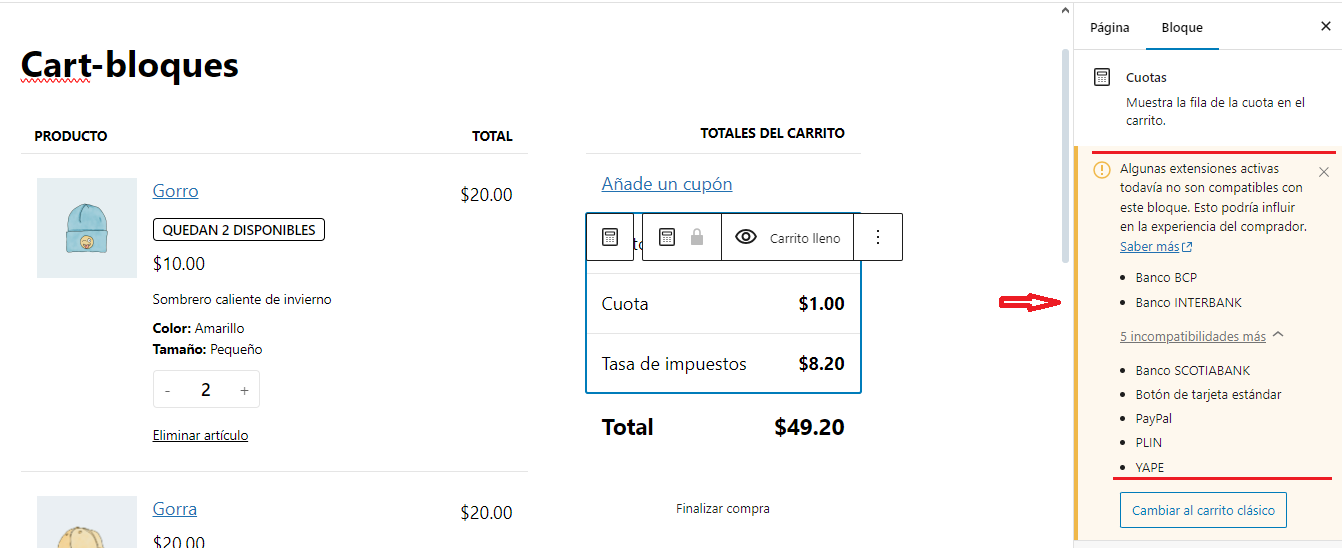
→ Para mostrar el contenido del carrito utilizar el Shortcode [woocommerce_cart]
→ Para mostrar el contenido del Checkout utilizar el Shortcode [woocommerce_checkout]
implementar en la pasarela de pago de WooCommerce la opcion de pago de YAPE (Peru)
Implementar el siguiente codigo en tu sniper para implementar en la pasarela de pago de WooCommerce la opcion de pago de YAPE (Peru)
/*
 * Documentacion Oficial WooCommerce
 * https://developer.woocommerce.com/docs/woocommerce-payment-gateway-api/
*/

/*
 → Paso 1
 El filtro "woocommerce_payment_gateways" le permite agregar pasarelas
 de pago personalizadas a  woocommerce; en este paso Definimos nuestra clase
 */

add_filter( 'woocommerce_payment_gateways', 'funcion_agregar_clase_pasarela_woo' );

function funcion_agregar_clase_pasarela_woo( $gateways ) {
	$gateways[] = 'mi_clase_yape'; // Definimos nuestra clase aqui
	return $gateways;
}


/*
 → Paso 2
A continuación, crea una clase que amplía(extends) la clase "WC_Payment_Gateway".
 En su constructor,  debes configurar la identificación única,
el título y la descripción de tu pasarela de pago.
También debe inicializar los campos del formulario
y la configuración de la pasarela de pago.

La clase de pasarela de pago debe definirse en una función
llamada mediante el hook plugins_loaded
 */


add_action( 'plugins_loaded', 'mi_funcion_yape_init_gateway_class' );


function mi_funcion_yape_init_gateway_class() {
       // hacemos referencia a la clase que definimos en el paso 1
	class mi_clase_yape extends WC_Payment_Gateway {

/**
 		 * Class constructor, more about it in Step 3
 		 */
     public function __construct() {
               // identificación única de la pasarela de pago
               // // Nota: el id debe ser igual al Nombre de la clase, si le pones diferente no mostrara la configuracion en la pestaña pagos de woocommerce
				$this->id = 'mi_clase_yape';

		 // URL del ícono que se mostrará en la página de pago cerca del nombre
				$this->icon = 'https://unidadvirtual.com/recursos-wordpress/woocommerce/pasarela-de-pagos/yape/icono-pago-con-yape.webp';

                // Activa o desactiva - define si se mostrara en la página de pago de los usuarios
				$this->has_fields = true;

				// Título del método de pago que se muestra en la página de administración.
				$this->method_title = 'YAPE';
		 		//Descripción del método de pago que se muestra en la página de administración.
				$this->method_description = 'Paga con Yape';

				// gateways can support subscriptions, refunds, saved payment methods,
				// but in this tutorial we begin with simple payments
				$this->supports = array(
					'products'
				);

				// Method with all the options fields
				$this->init_form_fields();

				// Load the settings.
				$this->init_settings();
				$this->title = $this->get_option( 'title' );
				$this->description = $this->get_option( 'description' );
				$this->enabled = $this->get_option( 'enabled' );


				// This action hook saves the settings
				add_action( 'woocommerce_update_options_payment_gateways_' . $this->id, array( $this, 'process_admin_options' ) );

				// We need custom JavaScript to obtain a token
				add_action( 'wp_enqueue_scripts', array( $this, 'payment_scripts' ) );

				// You can also register a webhook here
				// add_action( 'woocommerce_api_{webhook name}', array( $this, 'webhook' ) );
		 } // Fin Constructor


/**
* Plugin options, we deal with it in Step 3 too
 */
public function init_form_fields(){

				$this->form_fields = array(
					'enabled' => array(
						'title'       => 'Enable/Disable',
						'label'       => 'Enable Yape',
						'type'        => 'checkbox',
						'description' => '',
						'default'     => 'no'
					),
					'title' => array(
						'title'       => 'Title',
						'type'        => 'text',
						'description' => 'This controls the title which the user sees during checkout.',
						'default'     => 'Paga con YAPE',
						'desc_tip'    => true,
					),
					'description' => array(
						'title'       => 'Description',
						'type'        => 'textarea',
						'description' => 'This controls the description which the user sees during checkout.',
						'default'     => 'Pay with your credit card via our super-cool payment gateway.',
						 'css'           => 'width:80%;height:400px',
					),

				);
			} // Fin init_form_fields


/**
* You will need it if you want your custom credit card form, Step 4 is about it
 */
 public function payment_fields() {

      if( $this->description ) {
       		// you can instructions for test mode, I mean test card numbers etc.
       		if( $this->testmode ) {
           			$this->description .= ' TEST MODE ENABLED. In test mode, you can use the card numbers listed in <a href="#">documentation</a>.';
           			$this->description  = trim( $this->description );
       		}
       		// display the description with <p> tags etc.
               		echo wpautop( wp_kses_post( $this->description ) );
            }
  } //Fin function payment_fields


/*   Custom payment script */
 public function payment_scripts() {
       // You can add custom JavaScript here for your payment gateway
 }


  /* Process the payment   */

	function process_payment( $order_id ) {
		global $woocommerce;
		$order = new WC_Order( $order_id );

			// Mark as on-hold (we're awaiting the cheque)
			$order->update_status('on-hold', __( 'Awaiting cheque payment', 'woocommerce' ));
		  //   $order->update_status('processing', __( 'Awaiting cheque payment', 'woocommerce' ));


			// Remove cart
			$woocommerce->cart->empty_cart();

			// Return thankyou redirect
			return array(
				'result' => 'success',
				'redirect' => $this->get_return_url( $order )
		);
	}


 }  //FIN mi_clase_yape
}  // FIN Funcion mi_funcion_yape_init_gateway_class
Ingresar codigo HTML en Pestaña Pagos opcion Yape
Una vez ingresado el siguiente codigo ir a WooCommerce > Ajustes > Pestaña pagos
En YAPE – Paga con YAPE presionar en el boton Gestionar e ingresar el siguiente codigo en la Descripcion:
<div class="ctn_yape">
Escanee nuestro QR con su aplicación Yape, o agregue nuestro número celular a sus contactos y realice su pago con Yape.
<div class="estilo_yape">
<div class="qr_yape">
<img src="PONER_URL_IMAGEN_TU_QR_YAPE">
<br>
    <p class="titular_yape_plin">PONER_NOMBRE_TITULAR</p>
</div>
<div class="descrip_yape">
<div class="logo_yape"></div>
<p><b>Empresa:</b>PONER_NOMBRE_EMPRESA<br>
<b>RUC:</b> PONER_RUC_EMPRESA<br>
<b>Celular Yape:</b> PONER_CELULAR_YAPE<br>
<a class="boton_contacto_yape" href="tel:+51PONER_CELULAR_YAPE">Añadir a contacto</a>
</p></div>
</div>
</div>
Ingresar Codigo CSS
Ingresamos codigo css
.ctn_yape {
    background: #742284 !important;
    color: #fff !important;
    padding: 4% !important;
    border-radius: 10px !important;
    display: flex;
    flex-direction: column;
    line-height: 1.2 !important;
    letter-spacing: -0.3px !important;
}

.ctn_yape p {
line-height: 25px;
}
.estilo_yape {
	  display: flex;
    justify-content: space-around;
    padding: 25px 0 !important;
}
.qr_yape {
    width: 50% !important;
    text-align: center !important;
}
.descrip_yape{
	   width: 40% !important;
    text-align: center !important;
}
.logo_yape {
    width: 100% !important;
    height: 100px !important;
    background-image: url(https://unidadvirtual.com/recursos-wordpress/woocommerce/pasarela-de-pagos/yape/logo-yape.png) !important;
    background-size: contain !important;
    background-repeat: no-repeat !important;
    background-position: center !important;
	margin-bottom: 10px;
}

.boton_contacto_yape {
  display: flex;
    justify-content: center;
    /* margin-top: 10px; */
    background: #F39314 !important;
    color: #fff !important;
    border-radius: 8px !important;
    line-height: 1.1 !important;
    padding: 8px 1% !important;
    text-decoration: none !important;
    text-transform: initial !important;
    font-weight: bold !important;
    box-shadow: rgba(0, 0, 0, 0.07) 0px 1px 1px, rgba(0, 0, 0, 0.07) 0px 2px 2px, rgba(0, 0, 0, 0.07) 0px 4px 4px, rgba(0, 0, 0, 0.07) 0px 8px 8px, rgba(0, 0, 0, 0.07) 0px 16px 16px;
    transition: all 0.3s ease-in-out !important;
    text-align: center !important;
    margin-top: 20px !important;
}

.titular_yape {
    display: block !important;
    width: 100% !important;
    color: #ffffff !important;
    text-decoration: none !important;
    line-height: 1.2 !important;
    font-weight: bold !important;
    font-size: 16px !important;
    text-align: center !important;
    text-transform: uppercase !important;
}
Vea tambien
→ Woocommerce : QR Yape - Plin y bancos BCP - INTERBANK - SCOTIABANK
► Descarga Codigo
👉 Codigo Woocommerce QR Yape - Plin y bancos BCP - INTERBANK - SCOTIABANK
Errores que se pueden producir
Tema :
https://www.wpthemedetector.com/
Blocksy theme / Version:2.0.55 / Author:CreativeThemes
https://creativethemes.com/blocksy/ - https://wordpress.org/themes/blocksy/
https://wordpress.org/download/releases/