


Woocommerce : QR Yape - Plin y bancos BCP - INTERBANK - SCOTIABANK
Fecha Publicación:
13 de Mayo de 2024
Fecha Modificación:
18 de Septiembre de 2024
→ Ir a la Página oficial de WooCommerce Payment Gateway API
Woocommerce Agregar Medios de pagos Perú QR Yape - Plin y mostrar cuentas de bancos bcp-interbank-scotiabank
Nota : A partir de la versión 8.3 de WooCommerce, los bloques de carrito y de pago son los predeterminados para las nuevas instalaciones.
Referencia : Extensiones son incompatibles con los bloques de carrito y de pago
Referencia : Extensiones son incompatibles con los bloques de carrito y de pago
NOTA IMPORTANTE : Este codigo no es compatibles con paginas que utilizan bloques , debera usar shortcodes de WooCommerce.
Referencia : Extensiones son incompatibles con los bloques de carrito y de pago
Referencia : Extensiones son incompatibles con los bloques de carrito y de pago
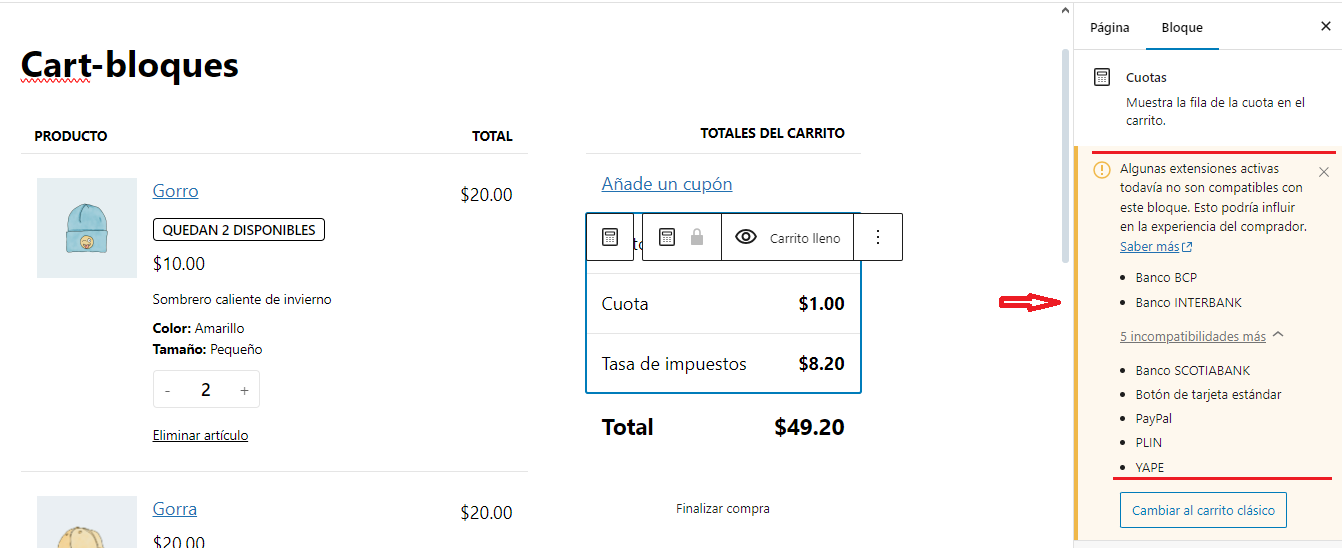
NOTA IMPORTANTE : Los codigos a utilizar solo son compatibles con paginas que utlizan shortcodes de WooCommerce tanto en la pagina del carrito como la pagina del Checkout , ejemplo:
→ Para mostrar el contenido del carrito utilizar el Shortcode [woocommerce_cart]
→ Para mostrar el contenido del Checkout utilizar el Shortcode [woocommerce_checkout]
→ Para mostrar el contenido del carrito utilizar el Shortcode [woocommerce_cart]
→ Para mostrar el contenido del Checkout utilizar el Shortcode [woocommerce_checkout]
► Descarga Codigo
👉 Codigo Woocommerce QR Yape - Plin y bancos BCP - INTERBANK - SCOTIABANK
_WooCommerce_pasarela_de_pagos.scss
/*- INICIO pone el icono de cada metodo de pago de la pasarela al lado derecho --*/
.wc_payment_method label  { display: inline; }
.wc_payment_method label img {float: right; }
/*- FIN  pone el icono de cada metodo de pago de la pasarela al lado derecho --*/
/*-------- Inicio Pasarela de pago para yape-----------*/
.ctn_yape { background: #742284 !important;   color: #fff !important;
    padding: 4% !important; border-radius: 10px !important;
    display: flex;  flex-direction: column;
    line-height: 1.2 !important;letter-spacing: -0.3px !important;
}
.ctn_yape p {line-height: 25px;}
.estilo_yape { display: flex;  justify-content: space-around; padding: 25px 0 !important;}
.qr_yape { width: 50% !important; text-align: center !important;}
.descrip_yape{ width: 40% !important;text-align: center !important;}
.logo_yape { width: 100% !important;height: 100px !important;
    background-image: url(https://unidadvirtual.com/recursos-wordpress/woocommerce/pasarela-de-pagos/yape/logo-yape.png) !important;
    background-size: contain !important;background-repeat: no-repeat !important;
    background-position: center !important;	margin-bottom: 10px;
}

boton_contacto_yape {  display: flex; justify-content: center;
    background: #F39314 !important;  color: #fff !important;
    border-radius: 8px !important;   line-height: 1.1 !important;
    padding: 8px 1% !important; text-decoration: none !important;
    text-transform: initial !important;   font-weight: bold !important;
    box-shadow: rgba(0, 0, 0, 0.07) 0px 1px 1px, rgba(0, 0, 0, 0.07) 0px 2px 2px, rgba(0, 0, 0, 0.07) 0px 4px 4px, rgba(0, 0, 0, 0.07) 0px 8px 8px, rgba(0, 0, 0, 0.07) 0px 16px 16px;
    transition: all 0.3s ease-in-out !important;
    text-align: center !important; margin-top: 20px !important;
}

.titular_yape { display: block !important;  width: 100% !important;
    color: #ffffff !important;  text-decoration: none !important;
    line-height: 1.2 !important; font-weight: bold !important;
    font-size: 16px !important; text-align: center !important;
    text-transform: uppercase !important;}

/*-------- Fin Pasarela de pago para yape-----------*/
Nota : boton_contacto_yape { } ponerle el punto al iniciar porque es una clase , no le puse porque tengo problemas al guardarlo en mi blog
/*-------- Inicio Pasarela de pago para plin-----------*/

.ctn_plin { background: #08D4D8 !important;   color: #fff !important;
    padding: 4% !important; border-radius: 10px !important;
    display: flex;  flex-direction: column;
    line-height: 1.2 !important;letter-spacing: -0.3px !important;
}
.ctn_plin p {line-height: 25px;}
.estilo_plin { display: flex;  justify-content: space-around; padding: 25px 0 !important;}
.qr_plin { width: 50% !important; text-align: center !important;}

.descrip_plin{ width: 40% !important;text-align: center !important;}

.logo_plin { width: 100% !important;height: 100px !important;
    background-image: url(https://unidadvirtual.com/recursos-wordpress/woocommerce/pasarela-de-pagos/plin/logo-plin.png) !important;
    background-size: contain !important;background-repeat: no-repeat !important;
    background-position: center !important;	margin-bottom: 10px;
}
boton_contacto_plin {  display: flex; justify-content: center;
    background: #F39314 !important;  color: #fff !important;
    border-radius: 8px !important;   line-height: 1.1 !important;
    padding: 8px 1% !important; text-decoration: none !important;
    text-transform: initial !important;   font-weight: bold !important;
    box-shadow: rgba(0, 0, 0, 0.07) 0px 1px 1px, rgba(0, 0, 0, 0.07) 0px 2px 2px, rgba(0, 0, 0, 0.07) 0px 4px 4px, rgba(0, 0, 0, 0.07) 0px 8px 8px, rgba(0, 0, 0, 0.07) 0px 16px 16px;
    transition: all 0.3s ease-in-out !important;
    text-align: center !important; margin-top: 20px !important;
}
.titular_plin { display: block !important;  width: 100% !important;
    color: #ffffff !important;  text-decoration: none !important;
    line-height: 1.2 !important; font-weight: bold !important;
    font-size: 16px !important; text-align: center !important;
    text-transform: uppercase !important;}

/*-------- Fin Pasarela de pago para plin -----------*/
Nota : boton_contacto_plin { } ponerle el punto al iniciar porque es una clase , no le puse porque tengo problemas al guardarlo en mi blog
/*-------- Inicio Pasarela de pago para Banco BCP Soles-----------*/

.ctn_bcp { background: #003F97 !important;   color: #fff !important;
    padding: 4% !important; border-radius: 10px !important;
    display: flex;  flex-direction: column;
    line-height: 1.2 !important;letter-spacing: -0.3px !important;
}
.desc_banco_bcp{line-height: 25px;}

.estilo_bcp{display: flex;  justify-content: space-around; padding: 5px 0 !important;margin-top: 10px;}
.logo_bcp {width: 30%;margin-right: 15px;}
.logo_bcp img { width: 130px;}

.ctn_ctas_bcp {width: 65%;}

.tipo_cta_bcp_1 {width: 100%;margin-bottom: 3px;}
.nro_cta_bcp_1 {width: 100%;font-size: 20px;font-weight: bold;}

.tipo_cta_bcp_2 {width: 100%;margin-top: 15px;margin-bottom: 3px;}
.nro_cta_bcp_2 {width: 100%;font-size: 20px;font-weight: bold;}

.ctn_titular_bcp {display: flex;flex-direction: column;width: 100%; text-align: center;}
.logo_titular_bcp { margin-bottom: 15px; }
.datos_titular_bcp { }
.datos_titular_bcp p { line-height: 8px; }

/*-------- Fin Pasarela de pago para Banco BCP Soles -----------*/
/*-------- Inicio Pasarela de pago para Banco INTERBANK Soles-----------*/

.ctn_interbank { background: #009D40 !important;   color: #fff !important;
    padding: 4% !important; border-radius: 10px !important;
    display: flex;  flex-direction: column;
    line-height: 1.2 !important;letter-spacing: -0.3px !important;
}
.desc_banco_interbank {line-height: 25px;}

.estilo_interbank {display: flex;  justify-content: space-around; padding: 5px 0 !important;margin-top: 10px;}
.logo_interbank {width: 30%;margin-right: 15px;}
.logo_interbank img { width: 130px;}


.ctn_ctas_interbank {width: 65%;}

.tipo_cta_interbank_1 {width: 100%;margin-bottom: 3px;}
.nro_cta_interbank_1 {width: 100%;font-size: 20px;font-weight: bold;}

.tipo_cta_interbank_2 {width: 100%;margin-top: 15px;margin-bottom: 3px;}
.nro_cta_interbank_2 {width: 100%;font-size: 20px;font-weight: bold;}

.ctn_titular_interbank {display: flex;flex-direction: column;width: 100%; text-align: center;}
.logo_titular_interbank { margin-bottom: 15px; }
.datos_titular_interbank { }
.datos_titular_interbank p { line-height: 8px; }

/*-------- Fin Pasarela de pago para Banco INTERBANK Soles -----------*/
/*-------- Inicio Pasarela de pago para Banco SCOTIABANK Soles-----------*/

.ctn_scotiabank { background: #EC111A !important;   color: #fff !important;
    padding: 4% !important; border-radius: 10px !important;
    display: flex;  flex-direction: column;
    line-height: 1.2 !important;letter-spacing: -0.3px !important;
}
.desc_banco_scotiabank {line-height: 25px;}

.estilo_scotiabank {display: flex;  justify-content: space-around; padding: 5px 0 !important;margin-top: 10px;}
.logo_scotiabank {width: 30%;margin-right: 15px;}
.logo_scotiabank img { width: 130px;}


.ctn_ctas_scotiabank {width: 65%;}

.tipo_cta_scotiabank_1 {width: 100%;margin-bottom: 3px;}
.nro_cta_scotiabank_1 {width: 100%;font-size: 20px;font-weight: bold;}

.tipo_cta_scotiabank_2 {width: 100%;margin-top: 15px;margin-bottom: 3px;}
.nro_cta_scotiabank_2 {width: 100%;font-size: 20px;font-weight: bold;}

.ctn_titular_scotiabank {display: flex;flex-direction: column;width: 100%; text-align: center;}
.logo_titular_scotiabank { margin-bottom: 15px; }
.datos_titular_scotiabank { }
.datos_titular_scotiabank p { line-height: 8px; }

/*-------- Fin Pasarela de pago para Banco SCOTIABANK Soles -----------*/
Pregunta de los usuarios
amigo estoy utilizando su código, sabe como puedo alinear las imágenes?
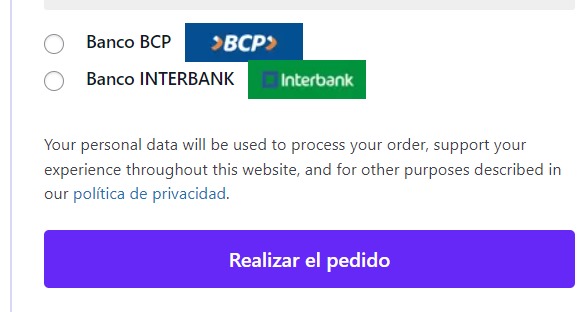
Respuesta : Poner el siguiente codigo CSS
.wc_payment_method label  { display: inline; }
.wc_payment_method label img {float: right; }
Articulo : 1774 - Veces Leidas